
As a global or SharePoint admin in your organization, you can change the URL for the following types of SharePoint sites (previously called "site collections"):
- Microsoft 365 group-connected team sites
- Modern team sites that don't belong to a Microsoft 365 group
- Communication sites
- Classic team sites
You can change only the address of the site within the URL, for example:
https://contoso.sharepoint.com/sites/projectx
to https://contoso.sharepoint.com/sites/projecty
You can't move the site from "/sites" to "/teams." For info about changing your SharePoint domain name, see Change your SharePoint domain name (preview).
It can take about 10 minutes to change the site address (depending on the size of the site), and the site will be read-only during this time. We recommend changing addresses during times when site usage is low.
You can change the address of up to 100 sites at a time. To change an additional site address, wait for another change to finish.
Following are the steps:
Go to the Active sites page of the new SharePoint admin center, and sign in with an account that has admin permissions for your organization.
To open the details pane, select the site name.
On the General tab, under URL, select Edit.
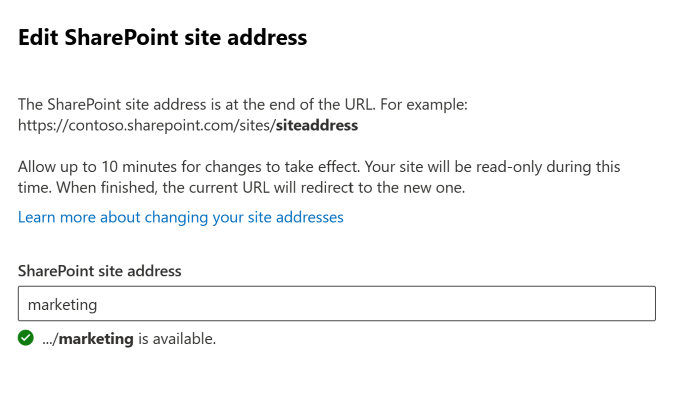
Enter the new site address, and then select Save.
Change site addresses by using Microsoft PowerShell
1- Download the latest SharePoint Online Management Shell
Connect to SharePoint as a global admin or SharePoint admin in Microsoft 365. To learn how, see Getting started with SharePoint Online Management Shell.
Run the following command to verify that the site address can be changed:
Start-SPOSiteRename -Identity <SiteURL> -NewSiteUrl <NewSiteURl> -ValidationOnly
Run the following command to change the site address:
Start-SPOSiteRename -Identity <SiteURL> -NewSiteUrl <NewSiteURl>
For more info about this cmdlet, see Start-SPOSiteRename
Effects of changing a site address are discussed under link mentioned as reference below,
Reference: Change a site address - SharePoint in Microsoft 365 | Microsoft Docs
Comments
0 comments
Please sign in to leave a comment.